A practical guide to shipping with Claude Code
We just launched claud code ship which can review your pull requests, work on fixes and approve the ones your team's policy allows. You may have a custom skill or workflow for these steps, but we wanted to offer an alternative. This guide walks through them based on my experience on the Claude Code team.
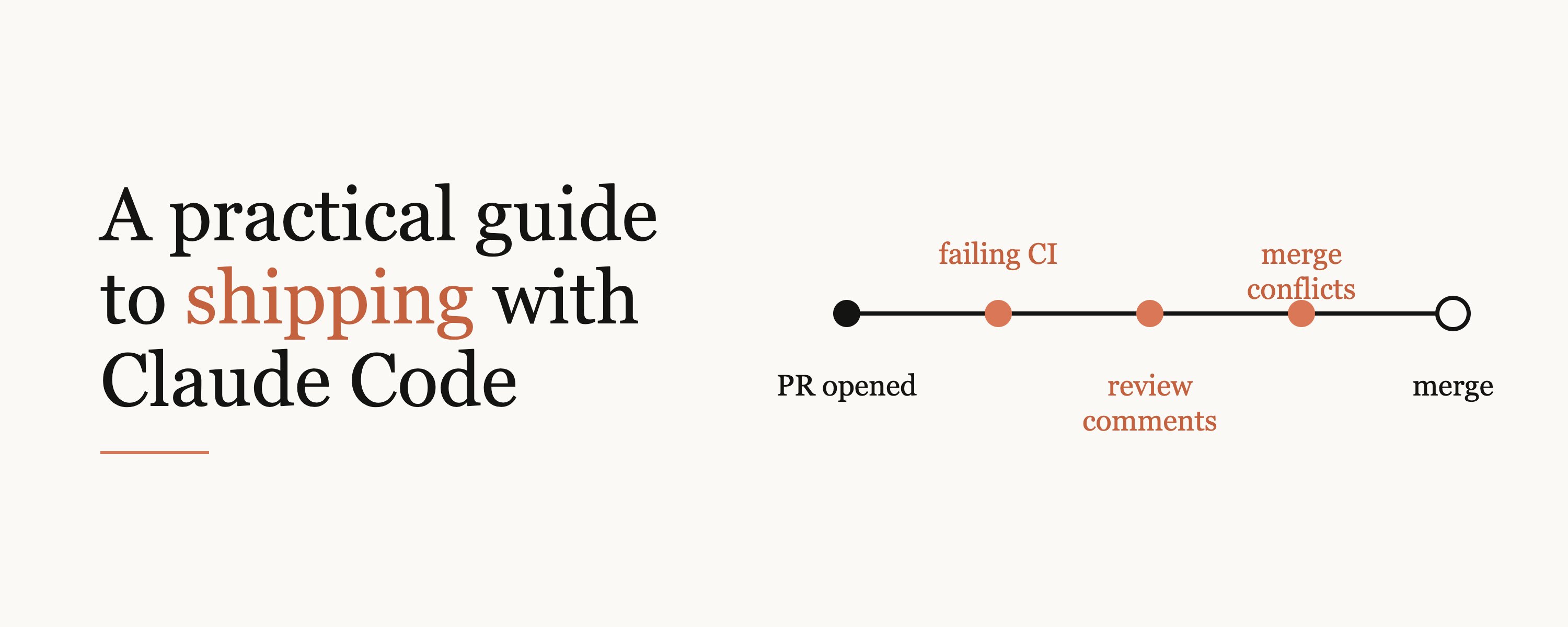
When you open a pull request, there's usually a bunch of follow-up work to be done:
- CI fails
- A review comes back with six comments
- A main merge creates a conflict
They're all tiny little tasks, but each one takes you off your focus work.
On our team an agent commonly does this follow-up work. For example, it can pick up an issue a reviewer found, so when the author gets back, the PR has already been updated once.
In my experience this is a more productive and enjoyable way to code. It minimizes context switching and keeps me in a flow state.
We've talked about the process the Claud Code team uses for the code review here and about the verification process undernath it here
Claude Ship is for a developer or tech lead whose team works on GitHub and who doesn't have admin privileges. You can start on your own right now by running a few commands, and save what you learn to files in your repo for the team to review. Admins only need to get involved if your team wants agents doing this automatically on the team's PRs.
You're still the architect of the process, so you're defining what to build, how to build it, and what the bar for merging is.
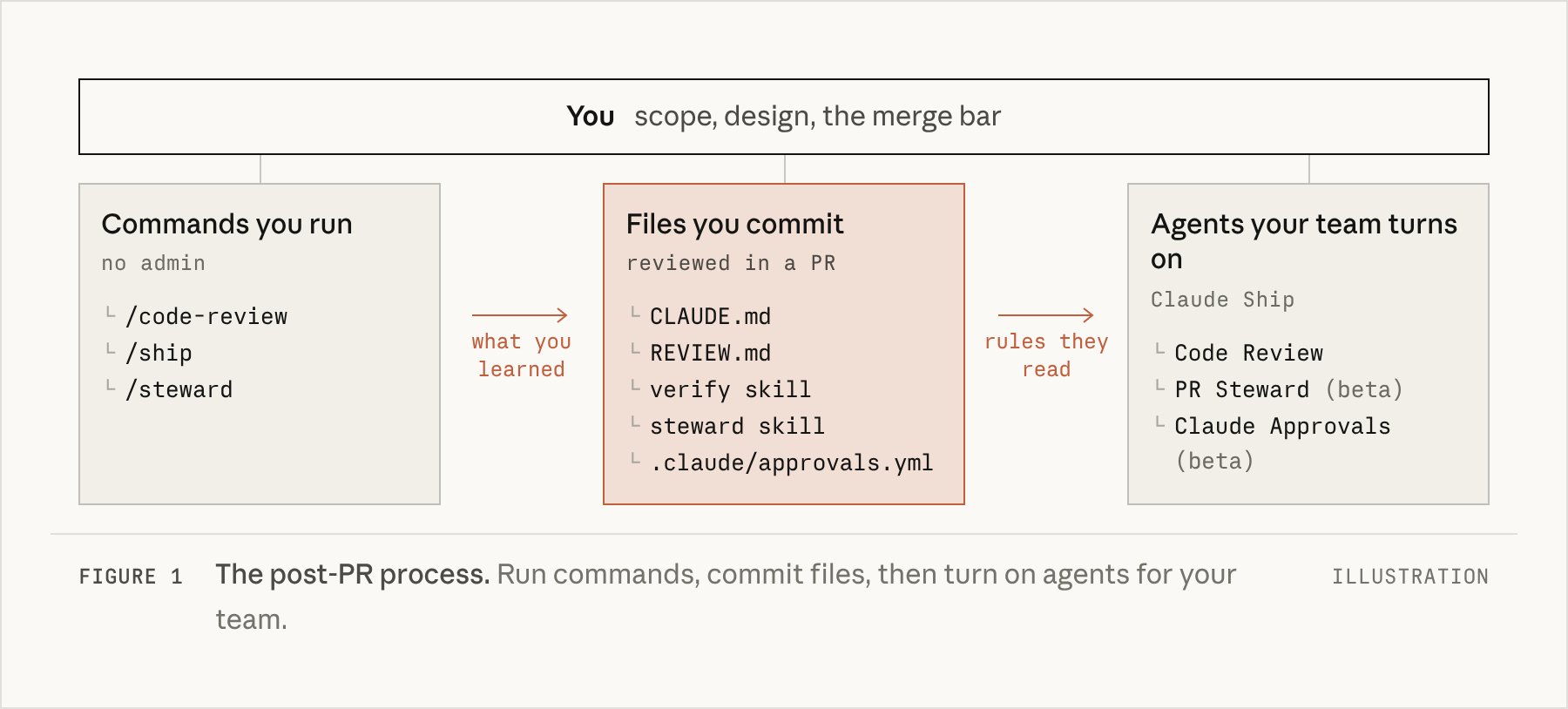
The post-PR process
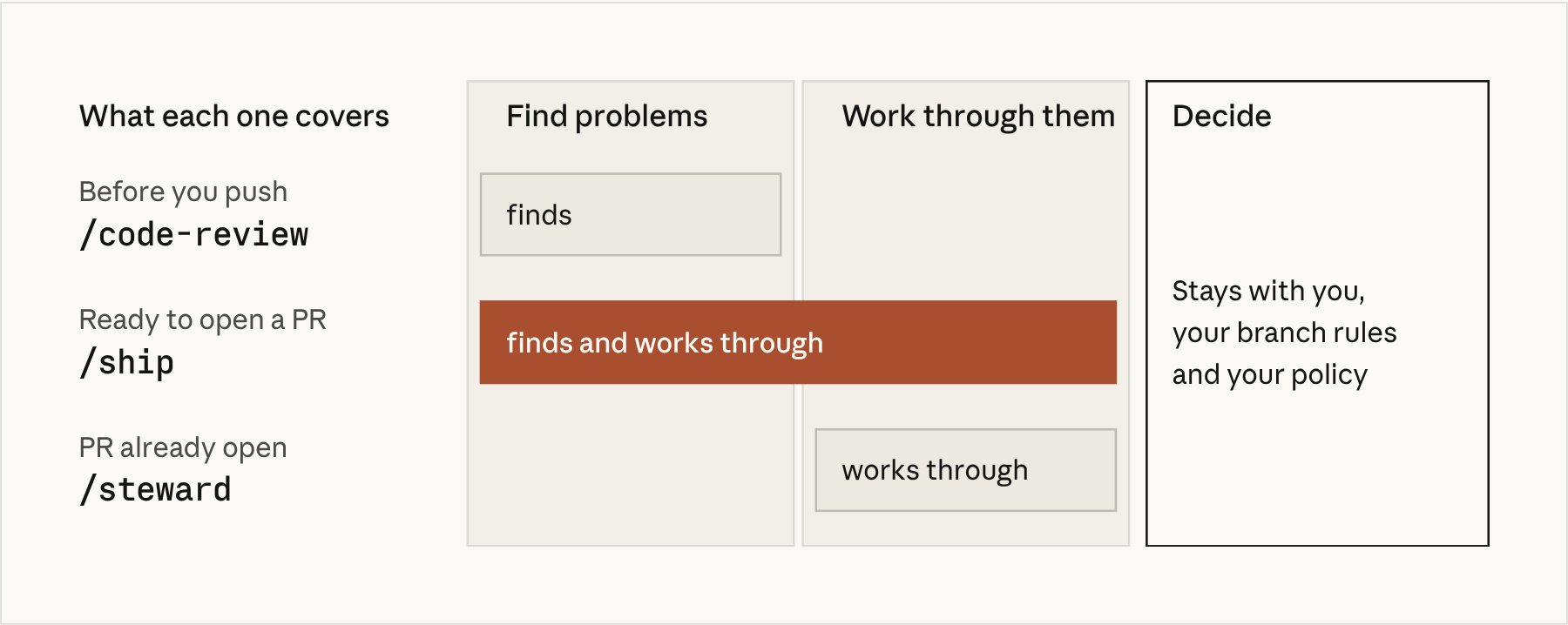
After you've opened a PR, you want to find issues, address issues, and make a final decision on if the change can be merged.
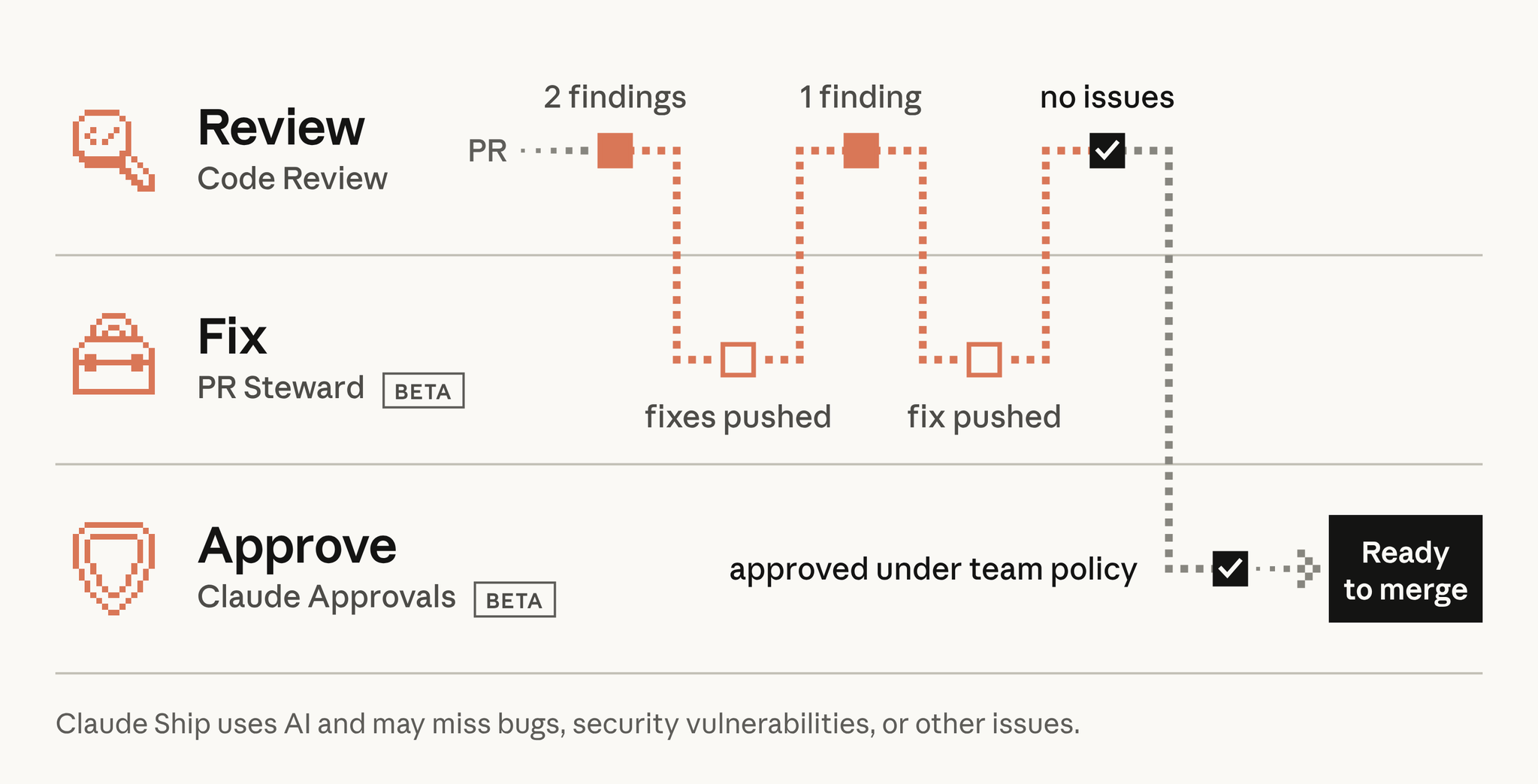
Claude Ship is three agents that tackle this work: Code Review, PR Steward (beta), and Claude Approvals (beta).
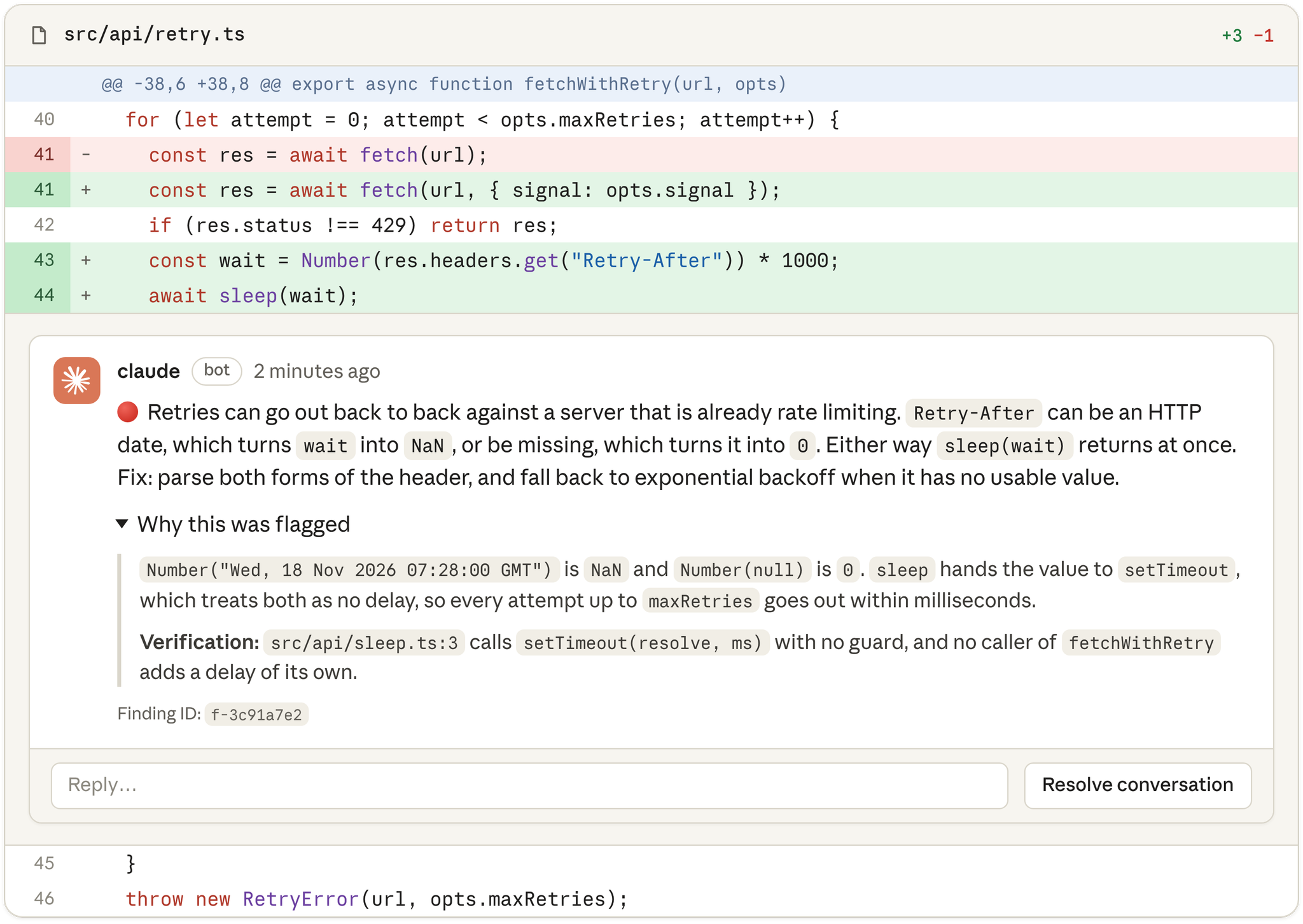
Code Review does an in-depth review of pull requests against the codebase through multiple lenses. It collects findings, adversarially verifies them, categorizes them and posts them to a PR.
PR Steward works to keep a PR green, but is designed not to approve or merge pull requests. It jumps in on failing CI checks, merge conflicts and review feedback from Code Review, other review tools, or team members. After every push, it comments with what it changed and how to undo it.
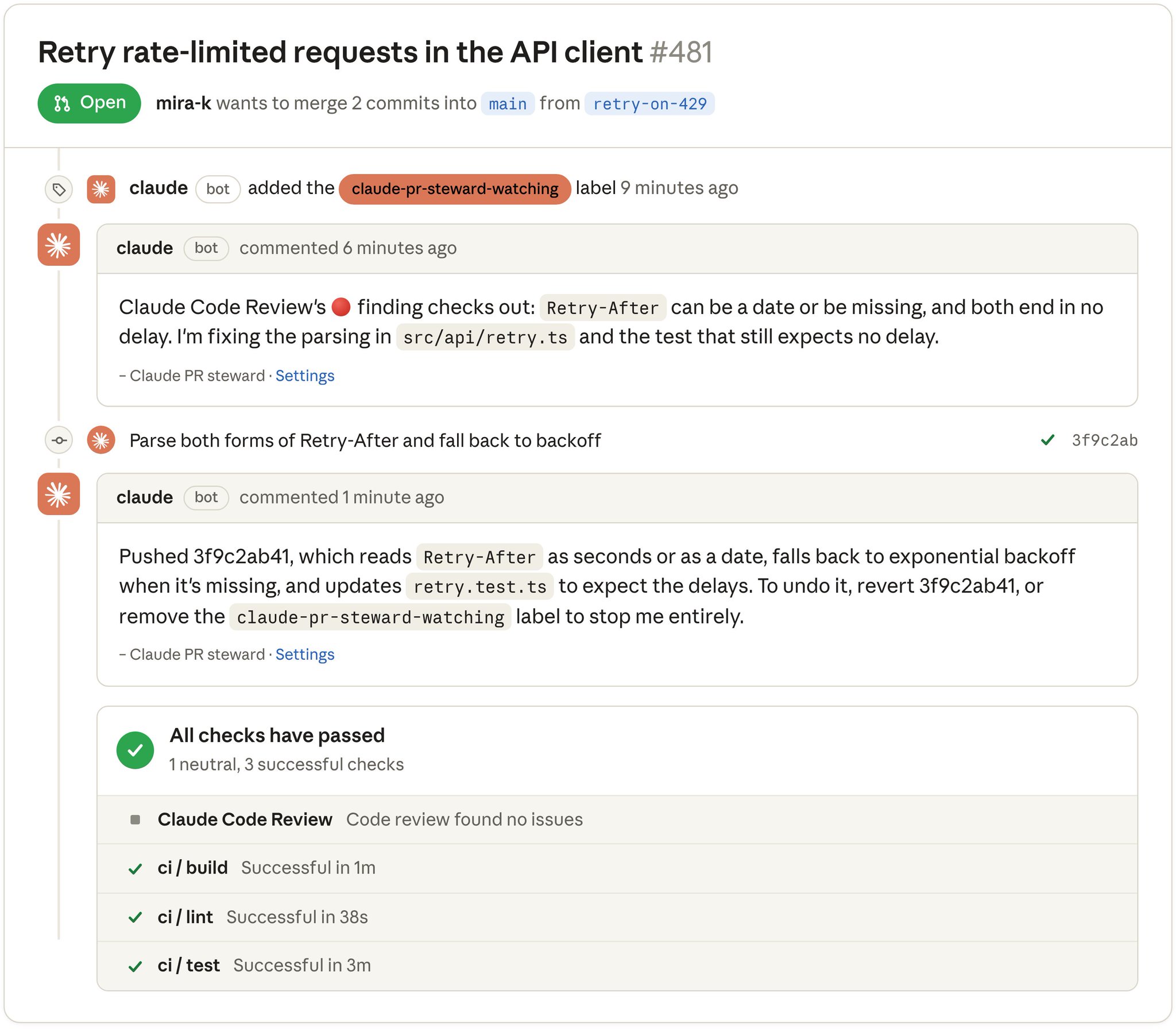
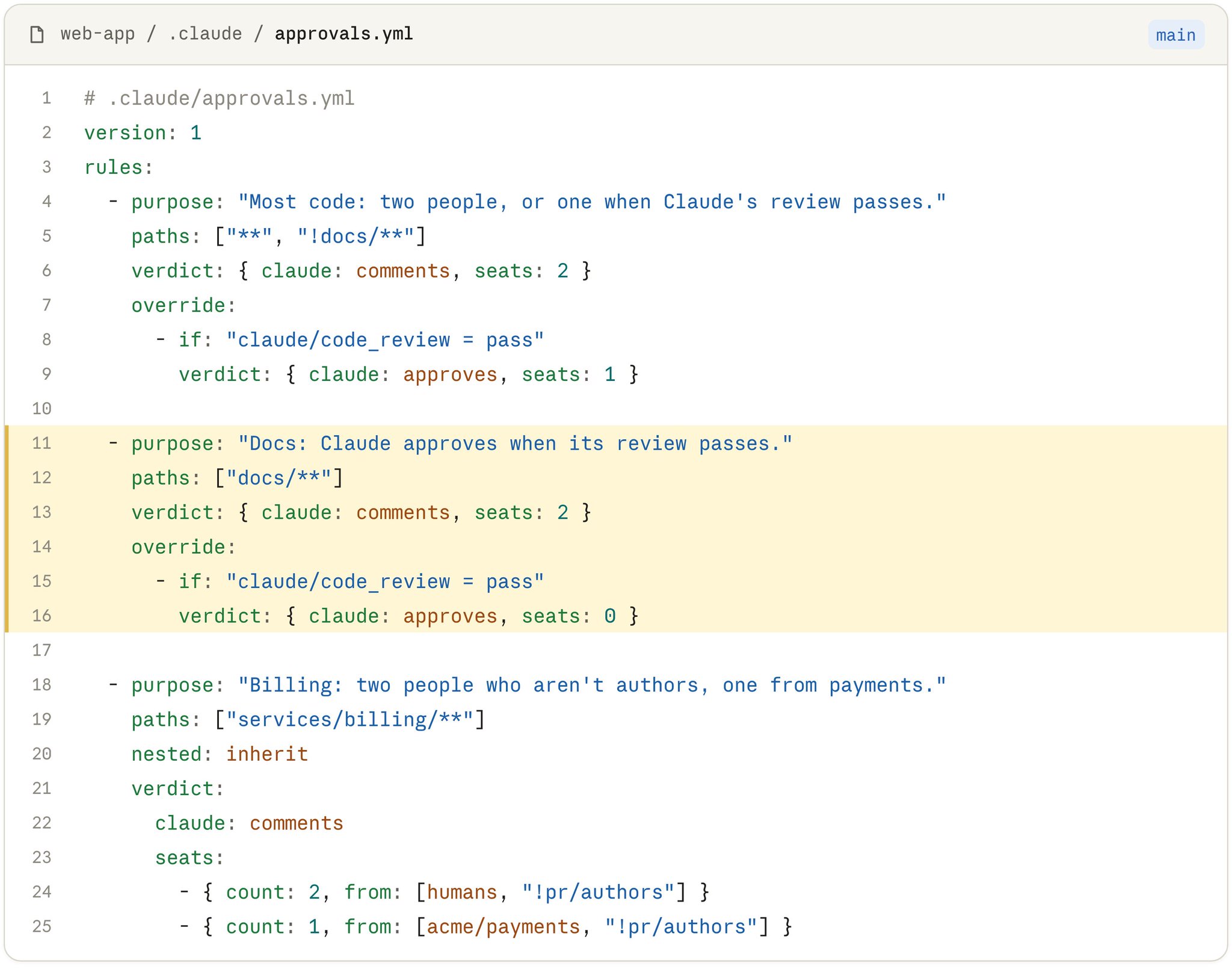
From there, Claude Approvals applies an approval policy that the team writes as a file in the repository. Claude can approve routine changes on its own if the policy allows it, or can require deeper human sign-off for certain scenarios. It works like a smarter CODEOWNERS file. Teams can have Claude Approvals consider a variety of signals in its decision-making process, including Code Review findings or their own classifiers.
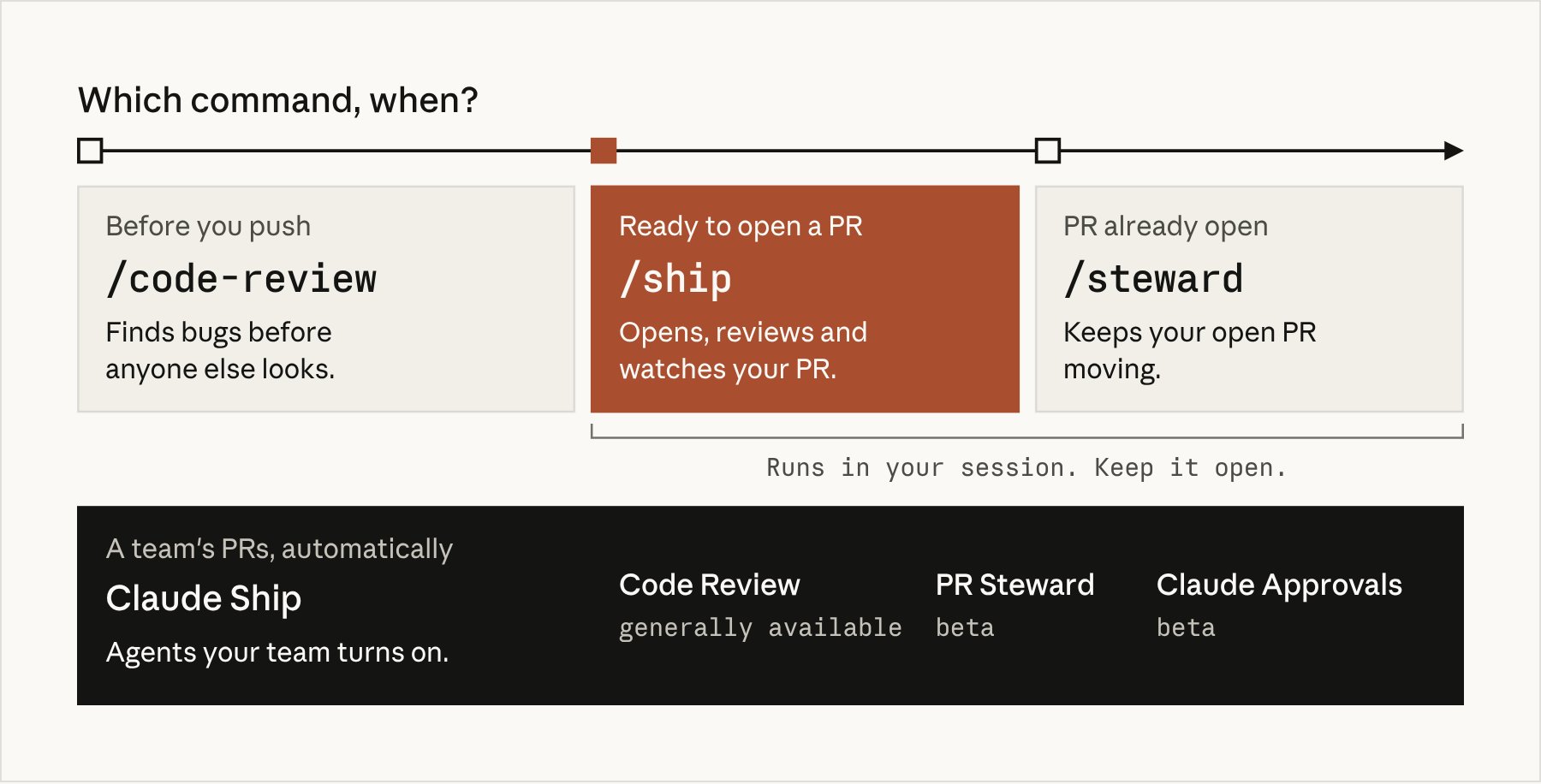
Code Review is generally available, and the other two are in beta. /ship is a command you run yourself in Claude Code to try Claude Ship on your own pull requests. It comes with the latest version of Claude Code, and it works even before an admin has turned on any of the agents.
You can partially automate the first two steps today. The last step is a decision that you set in your branch protections and (if your team adopts one) your policy file. Here is how it breaks down using the three agents that are part of Claude Ship:
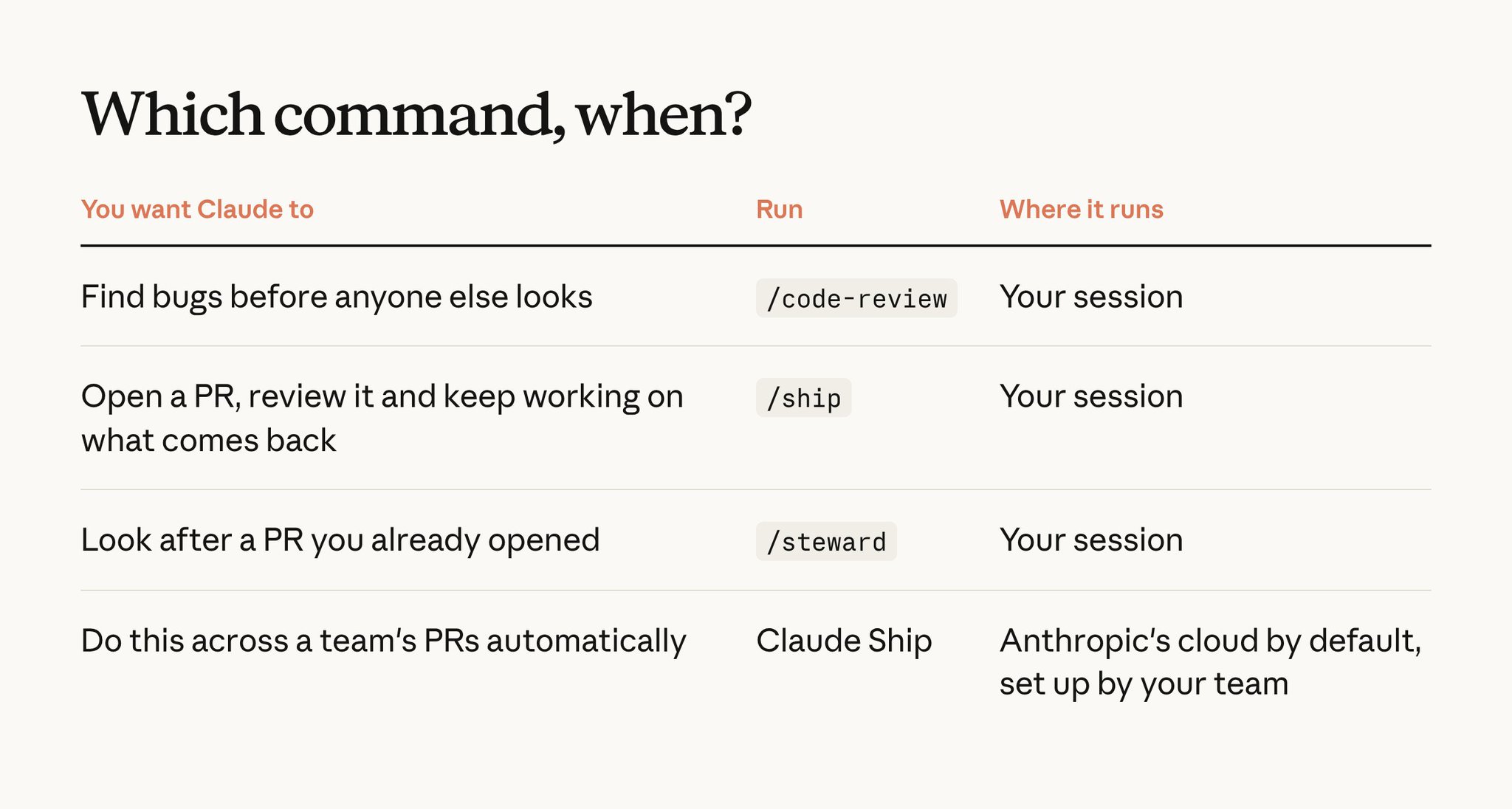
On your own PRs
Getting started today with /code-review
If you only do one thing from this post, review your branch before you push it. Any bugs you catch at this point are less likely to come back later as review comments or failed checks that pull you off of your next task. At the Claude Code prompt, enter this command:
/code-review
It reviews the commits on your branch and your uncommitted changes for correctness bugs. A few variations to keep in mind:
/code-review high 1234       # review PR 1234 at high effort
/code-review --fix           # apply the findings to your working tree
/code-review --comment 1234  # post the findings on the PR
/code-review ultra           # run a deeper review in the cloud
The effort range goes from low to max, with low returning only the findings the review is most sure about and higher levels giving you a broader set (including some it's less sure about). The command remembers your last effort, so enter a new one if the risk level changes.
A few caveats:
You will want to take extra care when using the ultra setting, which runs in the cloud, needs a login at claud.ai,and can be billed separately from your plan. ultraview docsRead the before trying it.
Edits made by --fix during a background review may not be caught by /rewind. Commit first if you want an easy way back.
Local /code-review reads your CLAUDE.md files, but not REVIEW.md. This matters later.
The first thing you should do is run /code-review a few times to understand what it catches and where it gets things wrong. You'll use this later.
Run /ship for your next PR
/ship
If you don't have a PR for your branch yet, /ship will:
Commit your pending changes. It behaves as if you had run git add -A, so it will respect your .gitignore. It will create a branch if necessary, and it will use your session to write the commit message. You will be notified of this before the commit, and can abort by hitting Esc.
Push and create the PR as you.
Perform a code review using /code-review, unless the commit has already been reviewed by Code Review. If the code review reports any issues, it will fix the ones it judges as valid for you.
Watch the PR for up to seven days. It will work on failing checks, conflicts, and review comments, and will exit if the PR is merged or closed.
The first step, where /ship commits your pending changes as if you had run git add -A, sometimes catches people by surprise, so be sure to run git status before running /ship.
The command will not commit changes that touch files with names that look like secrets, or files that set rules, like CLAUDE.md, REVIEW.md, or anything in the .claude/ or .github/ directories. You will need to make these commits manually beforehand.
Also, if you are working in a public repository, the command will not commit any changes for you. You will need to commit any pending changes manually before you can proceed, and if the PR already exists, it won't include your pending changes.
Optional: specifying effort level, PR, or bot
/ship high            # run at high effort
/ship 41              # work on pull request #41
/ship +my-lint-bot    # also read comments from my-lint-bot
/ship stop            # end the watch
The command will by default read comments by you, people with write access, and the Claude GitHub App. You can specify additional bots in the form +name. If that bot comments, it will be treated as an assertion to check against the code.
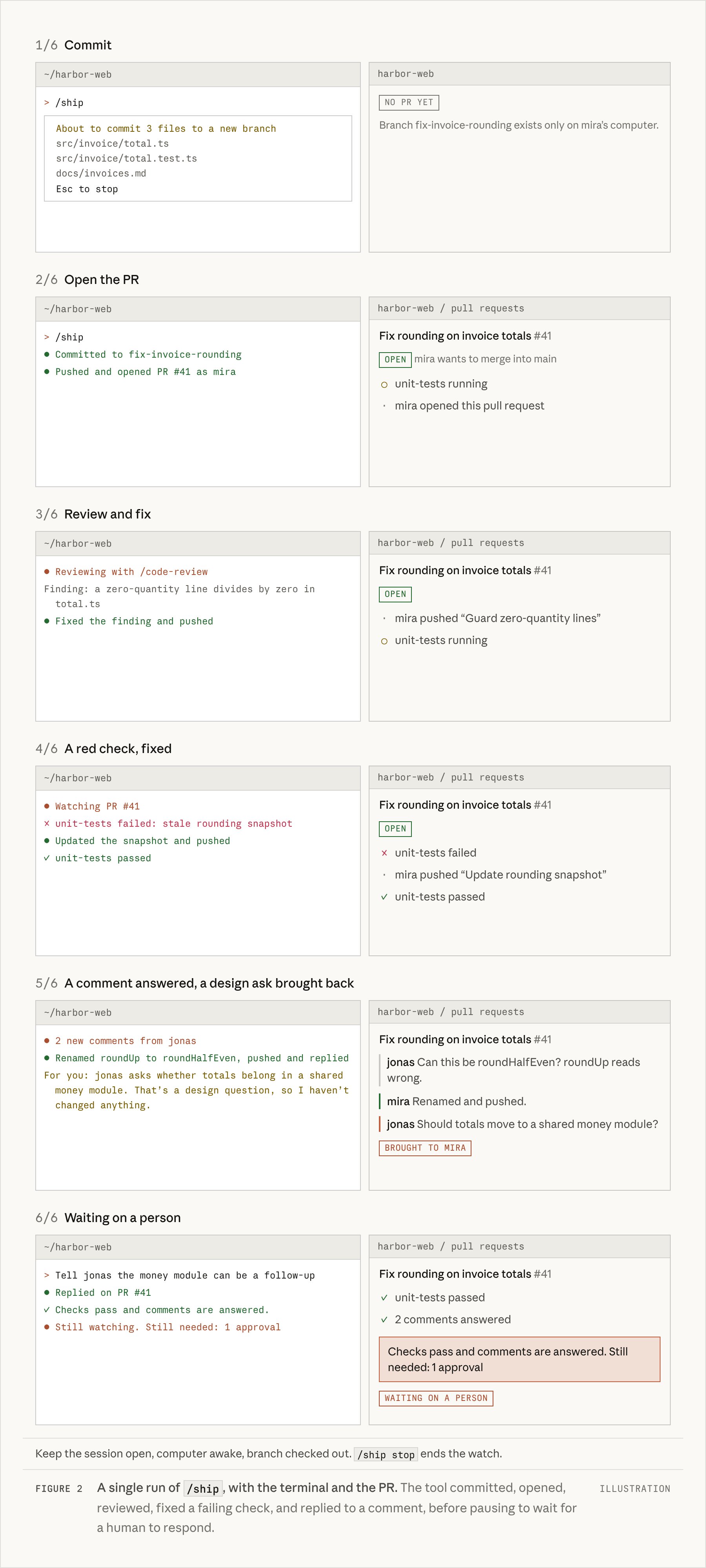
Letting Claude watch the PR
Claude watches the PR as you, on your machine, and uses your quota. Closing your laptop stops it, so keep the session open and the machine awake. You'll also need to be logged in to the GitHub CLI (run gh auth login first), and it only watches a PR
Ensure that the watch has its own checkout. You need to leave the branch checked out. If you're just going to jump straight into your next task, then make sure to use a separate worktree for one of them.
If the watch fails to start, Claude will explain why but still review the PR. For example, you can't run a watch if you have a PreToolUse or PermissionRequest hook on Bash in the .claude/settings.json of your repo.
Additionally, the watch uses up model turns while you're away, so it counts against your plan usage or API bill. The first time you use it, it's a good idea to be near your machine to make sure usage is within your expectations.
Only run the watch on repos you trust
The watch will merge the base branch into yours when necessary and then run commands like your tests. In other words, anyone who has the ability to land changes on the base branch has the ability to run commands on your machine during the watch. Only run the watch locally on a repo where you trust everyone who can land changes on the base branch.
Claude is told never to merge the PR, and Claude Code also constrains the gh and git commands it can run during an unattended turn, preventing direct merging or force-pushing. The watch's own commits also leave out the files that set the rules: .github/, CODEOWNERS, CLAUDE.md, .claude/, git hooks, etc.
However, this doesn't protect against all vectors. For example, the test script also runs under your credentials, and if you type a message during a turn, that will allow the constraints to be lifted for that turn. Additionally, if auto-merge is enabled, a fix from the watch could end up being what allows GitHub to merge.
Furthermore, the commits and pushes made by Claude during the watch are not affected by git hooks in your repo, so make sure any checks that need to be present are added to CI and branch rules.
For the full terms of the watch, run /ship terms in the product before your first time using it.
/steward 41
It will run just the watch component of /ship. It will watch the PR you opened and work on things like failing checks, conflicts, and comments, without reviewing it first.
If you don't specify a PR number, it will watch the PR for the current branch. It will take the same +name bots, and the same caveats as before apply.
However, if a PR is already labeled Steward, it will not run the local watch. And if it is unable to run a watch, /steward will not do anything.
If you want to stop the watch, you can use either /steward stop or /ship stop. Since a session can only run one watch at a time, starting a new one will terminate the previous one.
Don't confuse /steward with PR Steward, which is a team service that runs as claude[bot] after being enabled by an admin. The /steward command runs as you, in your session.
A PR that has red checks is a good place to start. A PR that gets stuck in a conflict loop is also a good candidate. On the flip side, a PR that's in the middle of a design debate is a bad one because that's your debate to settle.
Claude escalates bigger calls to you
As part of the watch, Claude is told to make small changes and elevate the bigger ones. Things like:
- A request to redesign something, like a new API or a bigger scope
- A security issue it wasn't able to resolve
It also pushes at most 3 times for a given issue, and then reports the attempted solutions.
That's roughly equivalent to our claim in the if we keep running the same check and it keeps failing after three rounds, then the approach is probably wrong.
At this point, it escalates to the author of the code.
In your repo
As you get a few PRs under your belt, you'll start to notice patterns. For instance:
- The same comment from the same reviewer
- A setup instruction that Claude has to figure out
- A flaky check
You can start to write these down for your team, in one of a few files, depending on which tool needs to read it:
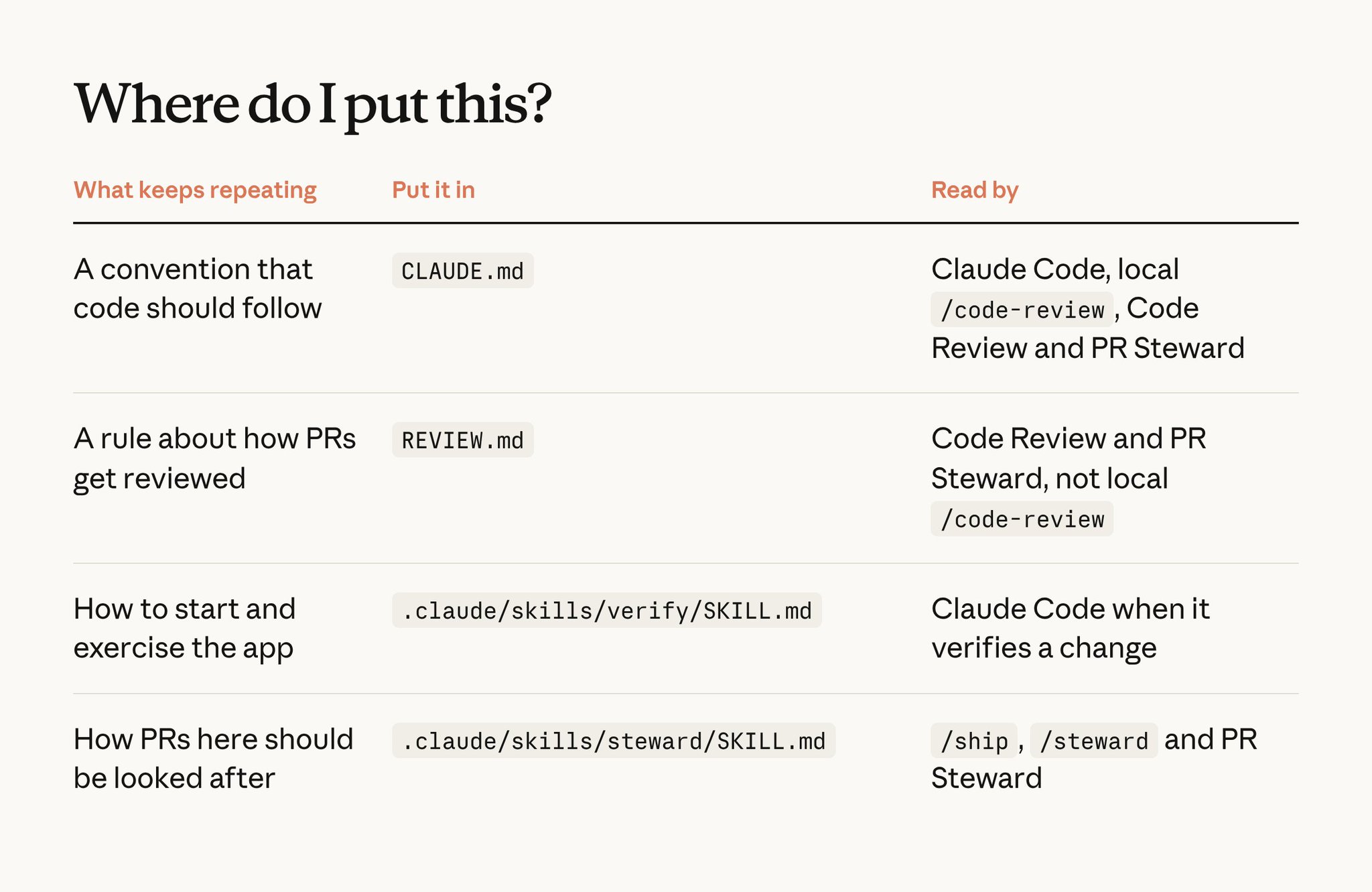
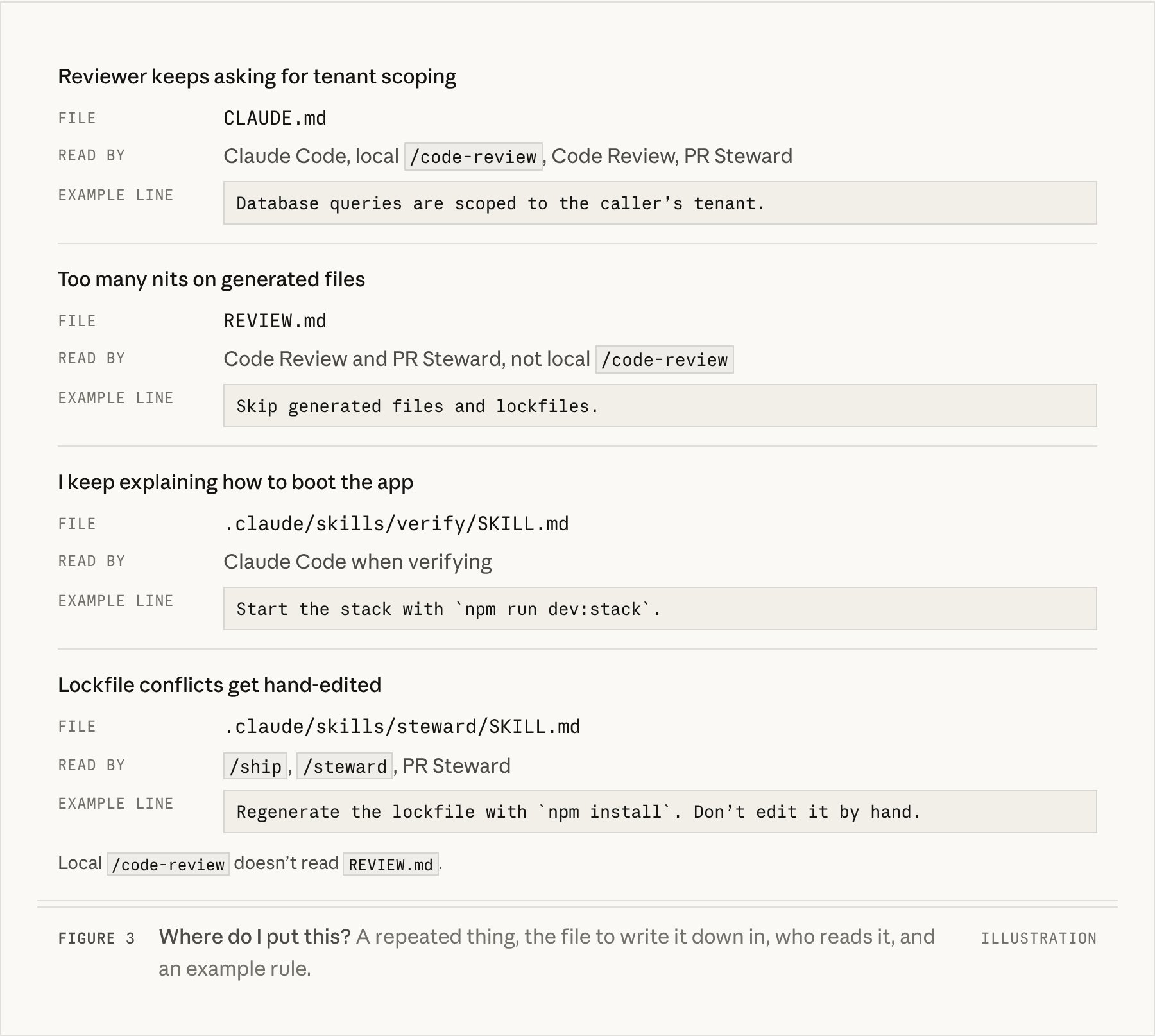
Repeat comments become review rules
Let's say you get asked by a peer twice to make sure a new query contains a tenant check. If you use local review, you can write this down in CLAUDE.md, since /ship uses /code-review to review. And if you have Code Review on your repository, the review-only rules can go in the root REVIEW.md:
# Review instructions

## What Important means here

Wrong results, leaked data or anything that blocks a rollback.
Style and naming are Nit at most.

## Always check
- Database queries are scoped to the caller's tenant.
- New API routes have an integration test.

## Keep it quiet
- Report at most five Nits.
- Skip generated files and lockfiles.
- Behavior claims need a file and line.
Code Review won't read the REVIEW.md file from the PR being reviewed. It will also only respect some instructions, like excluding paths and limiting nits, when the default branch is protected.
Not every comment should be elevated. On our team, we have a principle that a pattern has to be repeated on at least 2 PRs to be considered for a rule. A person then approves the PR that adds the rule. That's a good bar to adopt. You should also be deleting rules as needed.
Repeat setup becomes verify skills
If you find yourself constantly telling Claude how to boot up the app and navigate to specific pages, you should just write it down. Create .claude/skills/verify/SKILL.md. This can be in the root or in the directory of the code.
---
name: verify
description: Run the web app and exercise a change end to end. Use before committing.
---
1. Start the stack with npm run dev:stack.
- Wait for /healthz on port 3000 to return 200.
- Sign in with the seeded test account.
- Exercise the changed flow in the browser and take a screenshot.
- Report the steps you ran and what you saw. Don't report success without them. Be sure to customize the commands. Have Claude run it a few times, and fix any flaky behaviors. People ignore verification they don't trust.
Repeat PR maintenance becomes steward rules
This one can be easy to miss. The local watch reads the .claude/skills/steward/SKILL.md file from your working directory, whereas PR Steward, which runs in Anthropic's cloud, reads it from the default branch. Here's an example:
---
name: steward
description: House rules for looking after PRs in this repository
user-invocable: false
disable-model-invocation: true
---
Remove mode: observe and merge. Now Claude can approve wherever the rules say it approves.
About five minutes later, comment @claude approvals rerun on open PRs, so any stale results get cleaned up. Reruns can charge for classifiers again.
Ask a repository admin to make the Claude Approvals check required, and to pick the Claude app as its source. Until then, your PR can get merged regardless of what the check says.
About the author
- Software Engineer
Comments
Join the discussionNo comments yet. Be the first to comment.