Mastering createPortal in ReactJS: How to create portals in ReactJS
Software Engineer
What is createPortal
As per the official documentation, createPortal let us render some children into a different part of the DOM.
In simple words,createPortal lets you to render the component outside the current parent, or hierarchy.
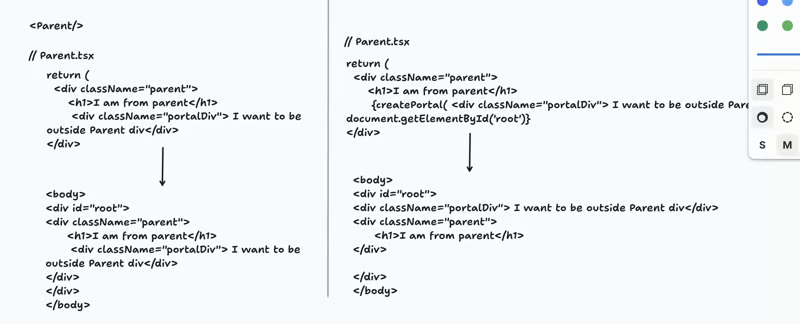
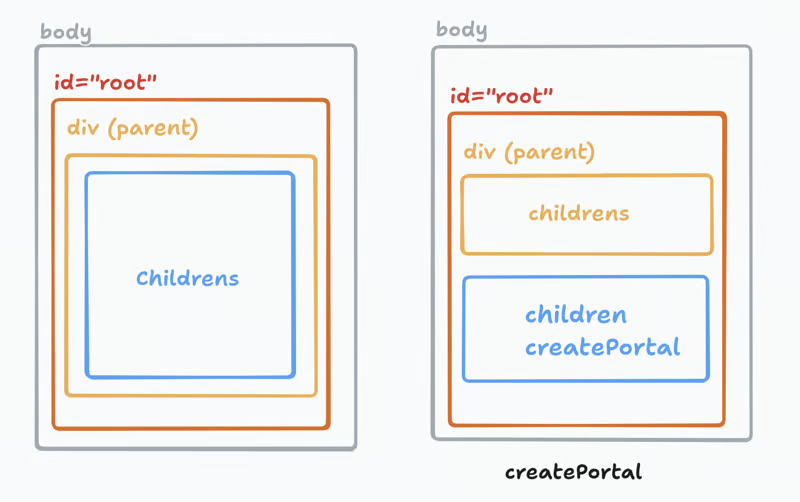
In above diagram, because we are using createPortal, 2nd div will be render outside the parent's div.
Use cases
Tooltips
Modals
Rendering different parts of DOM
React components render to non-react components
React components render to server-side content
Syntax
import { createPortal } from 'react-dom';createPortal(children, domNode, key?)
children: the jsx
domNode: where you want the portal to be created
key: an optional, A unique string or number to be used as the portal’s key.
Code
render outside current parent hierarchy
import React from "react";
import { createPortal } from "react-dom";

function App() {
  return (
    <div style={{ padding: "100px" }}>
      <h1>React Tooltip with Portal</h1>
      {createPortal(<h1>I am from create portal</h1>, document.getElementById('root') )}
    </div>
  );
}

export default App;
2 . render inside the root
import React from "react";
import { createPortal } from "react-dom";

function App() {
  return (
    <div style={{ padding: "100px" }}>
      <h1>React Tooltip with Portal</h1>
      {createPortal(<h1>I am from create portal</h1>, document.getElementById('root') )}
    </div>
  );
}

export default App;
3 . create a separate component
  return ReactDOM.createPortal(
    <div style={{ ...tooltipStyle, top: position.top, left: position.left }}>
      {text}
    </div>,
    document.body
  );